> ## Documentation Index
> Fetch the complete documentation index at: https://art.openpipe.ai/llms.txt
> Use this file to discover all available pages before exploring further.
# RULER
> Learn how to use RULER to automatically reward your agents.
# 📏RULER: Relative Universal LLM-Elicited Rewards
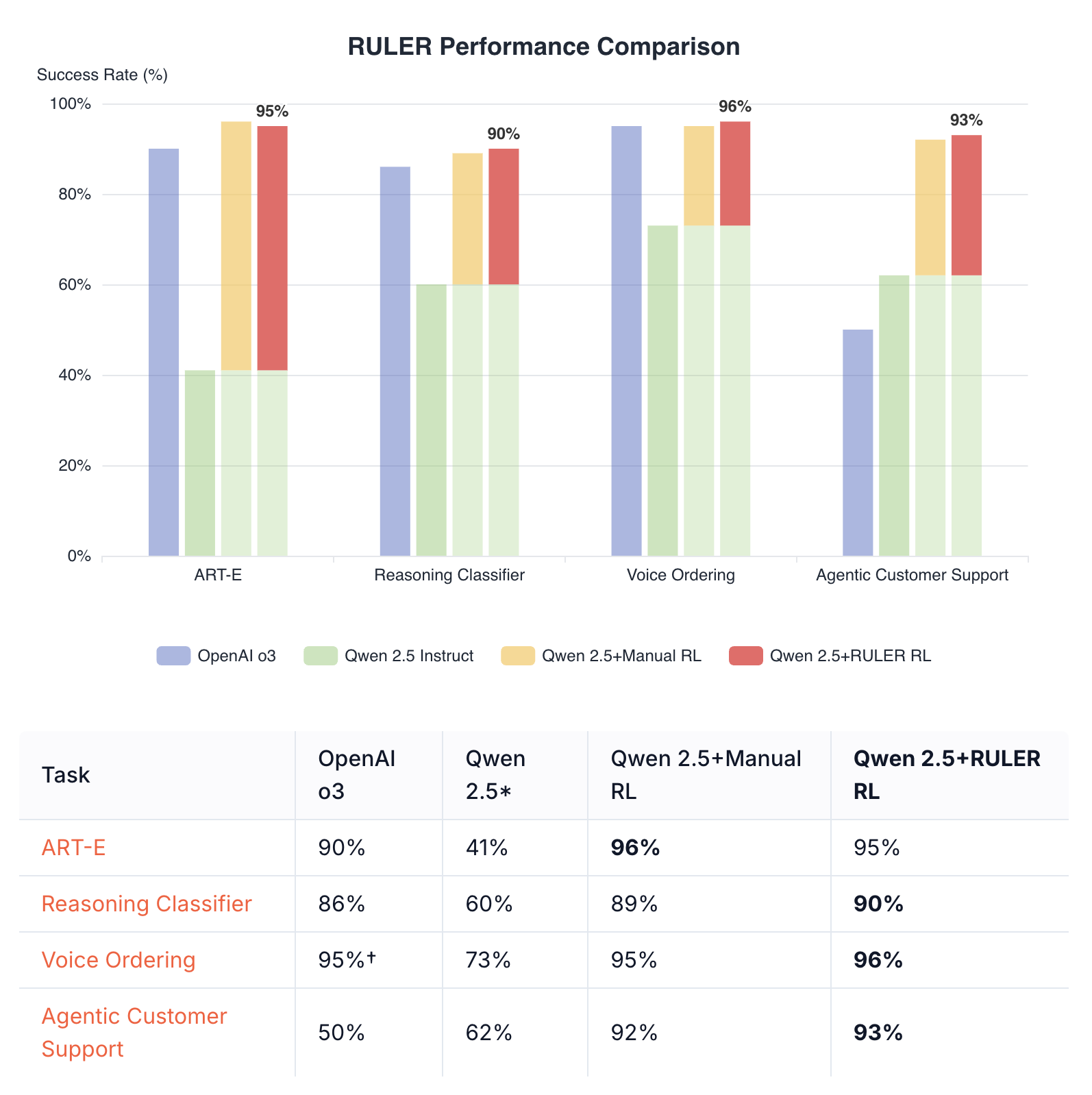
RULER (Relative Universal LLM-Elicited Rewards) is a general-purpose reward function that uses an LLM-as-judge to rank multiple agent trajectories. It requires no labeled data, expert feedback, or hand-crafted reward functions, yet reliably improves agent performance.
 ## Key Benefits
* **No labeled data required**: RULER works by comparing trajectories against each other
* **General-purpose**: Can be applied to a wide variety of RL tasks without modification
* **Fast development**: Can reduce implementation time by 2-3x compared to hand-crafted rewards
* **Strong performance**: Often matches or exceeds hand-crafted reward functions
## How RULER Works
RULER leverages two key insights:
1. **Relative scoring is easier than absolute scoring**: It's easier for an LLM to rank several solutions relative to each other than to score them in isolation
2. **GRPO only needs relative scores**: Since GRPO normalizes scores within each group, only the relative rankings matter, not absolute values
The process:
1. Generate N trajectories for a given scenario
2. Pass all N trajectories to RULER
3. RULER deduplicates common prefixes (e.g., identical system messages)
4. An LLM judge scores each trajectory from 0 to 1 based on goal achievement
5. These scores are used directly as rewards in GRPO training
## Basic Usage
```python theme={null}
import art
from art.rewards import ruler_score_group
# Create a TrajectoryGroup from your trajectories
group = art.TrajectoryGroup([...]) # List of art.Trajectory objects
# Use RULER to score them
judged_group = await ruler_score_group(
group,
"openai/o3",
debug=True # Shows the judge's reasoning
)
# Access the scores
if judged_group: # Check if judging succeeded
for traj in judged_group.trajectories:
print(f"Reward: {traj.reward}")
print(f"RULER explanation: {traj.logs[-1]}")
```
## Complete Example: Joke Generation
Here's a toy example showing how RULER ranks different quality trajectories:
```python theme={null}
import asyncio
import art
from art.rewards import ruler_score_group
from openai.types.chat.chat_completion import Choice
from openai.types.chat import ChatCompletionMessage
async def main():
# Initial messages shared by all trajectories
initial_messages = [
{"role": "system", "content": "You are a comedy writer. Generate funny jokes based on the given topic."},
{"role": "user", "content": "Tell me a funny joke about computers"}
]
# Create three trajectories with different quality responses
good_trajectory = art.Trajectory(
messages_and_choices=[
*initial_messages,
Choice(finish_reason="stop", index=0, message=ChatCompletionMessage(
role="assistant",
content="Why don't computers ever get invited to parties?\n\nBecause they always crash! 🥁\n\nBut seriously, have you tried turning them off and on again?"
))
],
reward=0.0
)
mediocre_trajectory = art.Trajectory(
messages_and_choices=[
*initial_messages,
Choice(finish_reason="stop", index=0, message=ChatCompletionMessage(
role="assistant",
content="What do you call a computer that doesn't work?\n\nBroken."
))
],
reward=0.0
)
off_topic_trajectory = art.Trajectory(
messages_and_choices=[
*initial_messages,
Choice(finish_reason="stop", index=0, message=ChatCompletionMessage(
role="assistant",
content="I don't really know jokes about computers, but here's a fact: The sky is blue because of Rayleigh scattering."
))
],
reward=0.0
)
# Create a TrajectoryGroup and use RULER to score
group = art.TrajectoryGroup([good_trajectory, mediocre_trajectory, off_topic_trajectory])
judged_group = await ruler_score_group(group, "openai/o3", debug=True)
# Display rankings
if judged_group:
sorted_trajectories = sorted(judged_group.trajectories, key=lambda t: t.reward, reverse=True)
for rank, traj in enumerate(sorted_trajectories, 1):
messages = traj.messages()
print(f"Rank {rank}: Score {traj.reward:.3f}")
print(f" Response: {messages[-1]['content'][:50]}...")
asyncio.run(main())
```
### Example Output
```
[RULER] Pretty-printed LLM choice JSON:
{
'scores': [
{
'trajectory_id': '1',
'explanation': 'This joke cleverly connects computer crashes with social situations, making it relatable and humorous. It also includes a common tech support line for added humor.',
'score': 0.9
},
{
'trajectory_id': '2',
'explanation': "While this joke is straightforward and a pun, it's quite simple and lacks depth. Still, it stays relevant to the computer theme.",
'score': 0.5
},
{
'trajectory_id': '3',
'explanation': 'This trajectory fails to deliver a joke about computers, instead providing an unrelated fact, resulting in a very low score.',
'score': 0.1
}
]
}
Rank 1: Score 0.900
Response: Why don't computers ever get invited to parties?...
Rank 2: Score 0.500
Response: What do you call a computer that doesn't work?...
Rank 3: Score 0.100
Response: I don't really know jokes about computers, but h...
```
## Customization
### Judge Model
You can use any LLM supported by LiteLLM as the judge:
```python theme={null}
# Using o4-mini
await ruler_score_group(group, "openai/o4-mini")
# Using Claude
await ruler_score_group(group, "anthropic/claude-sonnet-4-20250514")
# Using local models
await ruler_score_group(group, "ollama/qwen3:32b")
```
### Extra LiteLLM Parameters
You can pass additional parameters to LiteLLM for fine-tuning the judge behavior:
```python theme={null}
# Adjust temperature and max tokens
await ruler_score_group(
group,
"openai/o3",
extra_litellm_params={"temperature": 0.7, "max_tokens": 1000}
)
# Use custom API base for local models
await ruler_score_group(
group,
"openai/gpt-4",
extra_litellm_params={"api_base": "http://localhost:8000"}
)
```
### Custom Rubric
While the default rubric works well for most tasks, you can provide a custom one:
```python theme={null}
custom_rubric = """
- Prioritize responses that are concise and clear
- Penalize responses that include emojis or informal language
- Reward responses that cite sources
"""
await ruler_score_group(
group,
"openai/o3",
rubric=custom_rubric
)
```
### Using Raw Message Lists
If you're not using `art.Trajectory` objects, you can use the lower-level `ruler` function:
```python theme={null}
from art.rewards import ruler
# Each message list is a list of ChatCompletionMessageParam dicts
message_lists = [
[
{"role": "system", "content": "You are a helpful assistant."},
{"role": "user", "content": "What is 2+2?"},
{"role": "assistant", "content": "2+2 equals 4."}
],
# ... more trajectories
]
scores = await ruler(
message_lists,
"openai/o3"
)
for score in scores:
print(f"Trajectory {score.trajectory_id}: {score.score} - {score.explanation}")
```
## Best Practices
1. **Clear system prompts**: RULER uses the system prompt to understand the agent's goal. Make sure your system prompts clearly describe what the agent should do.
2. **Group size**: Use 4-8 trajectories per group for optimal balance between diversity and cost. Very large groups are not recommended because they can confuse the judge.
3. **Debug mode**: Enable `debug=True` to see the judge's reasoning, which helps identify scoring patterns.
4. **Judge selection**: Cheaper models like Qwen3 32B often work well and are more cost-effective than larger models.
## Integration with Training
RULER integrates into ART's training loop using the `gather_trajectory_groups` helper with an `after_each` callback:
```python theme={null}
import art
from art.rewards import ruler_score_group
# In your training loop
groups = await art.gather_trajectory_groups(
(
art.TrajectoryGroup(
rollout(model, scenario) for _ in range(4) # 4 trajectories per group
)
for scenario in batch_scenarios
),
after_each=lambda group: ruler_score_group(
group,
"openai/o3",
swallow_exceptions=True # Return None on error, filtering out the group
)
)
# Train on the judged groups
result = await backend.train(model, groups)
await model.log(groups, metrics=result.metrics, step=result.step, split="train")
```
The `swallow_exceptions=True` parameter is recommended in production to handle judge API failures gracefully - groups that fail to be judged are simply filtered out rather than crashing the training loop.
## Combining RULER with Independent Rewards
While not usually necessary, RULER can be easily combined with other reward functions that judge trajectories independently. You can calculate independent rewards before applying RULER during the rollout function, or calculate and combine them afterward. Either of these approaches allow you to combine hand-crafted rewards with RULER's general-purpose scoring.
### Preserving Original Rewards
If you assign rewards within your rollout function, RULER preserves them under the "independent\_reward" metric:
```python theme={null}
# Your trajectories already have rewards from rollout
judged_group = await ruler_score_group(group, "openai/o3", debug=True)
# Combine RULER scores with original rewards
for traj in judged_group.trajectories:
traj.reward += traj.metrics["independent_reward"]
```
### Adding Independent Rewards After Judging
Additionally, you can adjust rewards after calling `ruler_score_group`:
```python theme={null}
# Score with RULER first
judged_group = await ruler_score_group(group, "openai/o3", debug=True)
# Add your own scoring on top
for traj in judged_group.trajectories:
independent_reward = score(traj) # Your custom scoring function
traj.reward += independent_reward
```
## Performance Tips
* **Caching**: RULER automatically caches judge responses to disk to avoid redundant API calls
* **Batch processing**: Process multiple groups in parallel when possible
* **Token efficiency**: Common prefixes are automatically deduplicated to save tokens
## Troubleshooting
### Low scores for all trajectories
* Check that your system prompt clearly defines the task
* Ensure trajectories are actually attempting the task
* Try the default rubric before customizing
### Inconsistent rankings
* Increase group size for more stable relative rankings
* Use a more capable judge model
* Add more specific criteria to your rubric
### High API costs
* Use cheaper judge models (e.g., Qwen3 32B)
* Reduce group size
Since RULER uses LiteLLM under the hood, ART automatically suppresses harmless Pydantic serialization warnings from LiteLLM ([related issue](https://github.com/BerriAI/litellm/issues/11759)). To disable this behavior, set `SUPPRESS_LITELLM_SERIALIZATION_WARNINGS=0` in your environment.
## Key Benefits
* **No labeled data required**: RULER works by comparing trajectories against each other
* **General-purpose**: Can be applied to a wide variety of RL tasks without modification
* **Fast development**: Can reduce implementation time by 2-3x compared to hand-crafted rewards
* **Strong performance**: Often matches or exceeds hand-crafted reward functions
## How RULER Works
RULER leverages two key insights:
1. **Relative scoring is easier than absolute scoring**: It's easier for an LLM to rank several solutions relative to each other than to score them in isolation
2. **GRPO only needs relative scores**: Since GRPO normalizes scores within each group, only the relative rankings matter, not absolute values
The process:
1. Generate N trajectories for a given scenario
2. Pass all N trajectories to RULER
3. RULER deduplicates common prefixes (e.g., identical system messages)
4. An LLM judge scores each trajectory from 0 to 1 based on goal achievement
5. These scores are used directly as rewards in GRPO training
## Basic Usage
```python theme={null}
import art
from art.rewards import ruler_score_group
# Create a TrajectoryGroup from your trajectories
group = art.TrajectoryGroup([...]) # List of art.Trajectory objects
# Use RULER to score them
judged_group = await ruler_score_group(
group,
"openai/o3",
debug=True # Shows the judge's reasoning
)
# Access the scores
if judged_group: # Check if judging succeeded
for traj in judged_group.trajectories:
print(f"Reward: {traj.reward}")
print(f"RULER explanation: {traj.logs[-1]}")
```
## Complete Example: Joke Generation
Here's a toy example showing how RULER ranks different quality trajectories:
```python theme={null}
import asyncio
import art
from art.rewards import ruler_score_group
from openai.types.chat.chat_completion import Choice
from openai.types.chat import ChatCompletionMessage
async def main():
# Initial messages shared by all trajectories
initial_messages = [
{"role": "system", "content": "You are a comedy writer. Generate funny jokes based on the given topic."},
{"role": "user", "content": "Tell me a funny joke about computers"}
]
# Create three trajectories with different quality responses
good_trajectory = art.Trajectory(
messages_and_choices=[
*initial_messages,
Choice(finish_reason="stop", index=0, message=ChatCompletionMessage(
role="assistant",
content="Why don't computers ever get invited to parties?\n\nBecause they always crash! 🥁\n\nBut seriously, have you tried turning them off and on again?"
))
],
reward=0.0
)
mediocre_trajectory = art.Trajectory(
messages_and_choices=[
*initial_messages,
Choice(finish_reason="stop", index=0, message=ChatCompletionMessage(
role="assistant",
content="What do you call a computer that doesn't work?\n\nBroken."
))
],
reward=0.0
)
off_topic_trajectory = art.Trajectory(
messages_and_choices=[
*initial_messages,
Choice(finish_reason="stop", index=0, message=ChatCompletionMessage(
role="assistant",
content="I don't really know jokes about computers, but here's a fact: The sky is blue because of Rayleigh scattering."
))
],
reward=0.0
)
# Create a TrajectoryGroup and use RULER to score
group = art.TrajectoryGroup([good_trajectory, mediocre_trajectory, off_topic_trajectory])
judged_group = await ruler_score_group(group, "openai/o3", debug=True)
# Display rankings
if judged_group:
sorted_trajectories = sorted(judged_group.trajectories, key=lambda t: t.reward, reverse=True)
for rank, traj in enumerate(sorted_trajectories, 1):
messages = traj.messages()
print(f"Rank {rank}: Score {traj.reward:.3f}")
print(f" Response: {messages[-1]['content'][:50]}...")
asyncio.run(main())
```
### Example Output
```
[RULER] Pretty-printed LLM choice JSON:
{
'scores': [
{
'trajectory_id': '1',
'explanation': 'This joke cleverly connects computer crashes with social situations, making it relatable and humorous. It also includes a common tech support line for added humor.',
'score': 0.9
},
{
'trajectory_id': '2',
'explanation': "While this joke is straightforward and a pun, it's quite simple and lacks depth. Still, it stays relevant to the computer theme.",
'score': 0.5
},
{
'trajectory_id': '3',
'explanation': 'This trajectory fails to deliver a joke about computers, instead providing an unrelated fact, resulting in a very low score.',
'score': 0.1
}
]
}
Rank 1: Score 0.900
Response: Why don't computers ever get invited to parties?...
Rank 2: Score 0.500
Response: What do you call a computer that doesn't work?...
Rank 3: Score 0.100
Response: I don't really know jokes about computers, but h...
```
## Customization
### Judge Model
You can use any LLM supported by LiteLLM as the judge:
```python theme={null}
# Using o4-mini
await ruler_score_group(group, "openai/o4-mini")
# Using Claude
await ruler_score_group(group, "anthropic/claude-sonnet-4-20250514")
# Using local models
await ruler_score_group(group, "ollama/qwen3:32b")
```
### Extra LiteLLM Parameters
You can pass additional parameters to LiteLLM for fine-tuning the judge behavior:
```python theme={null}
# Adjust temperature and max tokens
await ruler_score_group(
group,
"openai/o3",
extra_litellm_params={"temperature": 0.7, "max_tokens": 1000}
)
# Use custom API base for local models
await ruler_score_group(
group,
"openai/gpt-4",
extra_litellm_params={"api_base": "http://localhost:8000"}
)
```
### Custom Rubric
While the default rubric works well for most tasks, you can provide a custom one:
```python theme={null}
custom_rubric = """
- Prioritize responses that are concise and clear
- Penalize responses that include emojis or informal language
- Reward responses that cite sources
"""
await ruler_score_group(
group,
"openai/o3",
rubric=custom_rubric
)
```
### Using Raw Message Lists
If you're not using `art.Trajectory` objects, you can use the lower-level `ruler` function:
```python theme={null}
from art.rewards import ruler
# Each message list is a list of ChatCompletionMessageParam dicts
message_lists = [
[
{"role": "system", "content": "You are a helpful assistant."},
{"role": "user", "content": "What is 2+2?"},
{"role": "assistant", "content": "2+2 equals 4."}
],
# ... more trajectories
]
scores = await ruler(
message_lists,
"openai/o3"
)
for score in scores:
print(f"Trajectory {score.trajectory_id}: {score.score} - {score.explanation}")
```
## Best Practices
1. **Clear system prompts**: RULER uses the system prompt to understand the agent's goal. Make sure your system prompts clearly describe what the agent should do.
2. **Group size**: Use 4-8 trajectories per group for optimal balance between diversity and cost. Very large groups are not recommended because they can confuse the judge.
3. **Debug mode**: Enable `debug=True` to see the judge's reasoning, which helps identify scoring patterns.
4. **Judge selection**: Cheaper models like Qwen3 32B often work well and are more cost-effective than larger models.
## Integration with Training
RULER integrates into ART's training loop using the `gather_trajectory_groups` helper with an `after_each` callback:
```python theme={null}
import art
from art.rewards import ruler_score_group
# In your training loop
groups = await art.gather_trajectory_groups(
(
art.TrajectoryGroup(
rollout(model, scenario) for _ in range(4) # 4 trajectories per group
)
for scenario in batch_scenarios
),
after_each=lambda group: ruler_score_group(
group,
"openai/o3",
swallow_exceptions=True # Return None on error, filtering out the group
)
)
# Train on the judged groups
result = await backend.train(model, groups)
await model.log(groups, metrics=result.metrics, step=result.step, split="train")
```
The `swallow_exceptions=True` parameter is recommended in production to handle judge API failures gracefully - groups that fail to be judged are simply filtered out rather than crashing the training loop.
## Combining RULER with Independent Rewards
While not usually necessary, RULER can be easily combined with other reward functions that judge trajectories independently. You can calculate independent rewards before applying RULER during the rollout function, or calculate and combine them afterward. Either of these approaches allow you to combine hand-crafted rewards with RULER's general-purpose scoring.
### Preserving Original Rewards
If you assign rewards within your rollout function, RULER preserves them under the "independent\_reward" metric:
```python theme={null}
# Your trajectories already have rewards from rollout
judged_group = await ruler_score_group(group, "openai/o3", debug=True)
# Combine RULER scores with original rewards
for traj in judged_group.trajectories:
traj.reward += traj.metrics["independent_reward"]
```
### Adding Independent Rewards After Judging
Additionally, you can adjust rewards after calling `ruler_score_group`:
```python theme={null}
# Score with RULER first
judged_group = await ruler_score_group(group, "openai/o3", debug=True)
# Add your own scoring on top
for traj in judged_group.trajectories:
independent_reward = score(traj) # Your custom scoring function
traj.reward += independent_reward
```
## Performance Tips
* **Caching**: RULER automatically caches judge responses to disk to avoid redundant API calls
* **Batch processing**: Process multiple groups in parallel when possible
* **Token efficiency**: Common prefixes are automatically deduplicated to save tokens
## Troubleshooting
### Low scores for all trajectories
* Check that your system prompt clearly defines the task
* Ensure trajectories are actually attempting the task
* Try the default rubric before customizing
### Inconsistent rankings
* Increase group size for more stable relative rankings
* Use a more capable judge model
* Add more specific criteria to your rubric
### High API costs
* Use cheaper judge models (e.g., Qwen3 32B)
* Reduce group size
Since RULER uses LiteLLM under the hood, ART automatically suppresses harmless Pydantic serialization warnings from LiteLLM ([related issue](https://github.com/BerriAI/litellm/issues/11759)). To disable this behavior, set `SUPPRESS_LITELLM_SERIALIZATION_WARNINGS=0` in your environment.